
5 Surprising Truths About Business Email You Probably Don't Know
Introduction: Beyond the Inbox
We use email every single day. It’s a tool so familiar that we assume we understand it completely. We send, receive, and archive messages with casual ease. But the world of professional business email—the kind that uses a custom domain like
you@yourcompany.com—operates under a complex and unforgiving set of rules that are largely invisible to the average user.This article pulls back the curtain to reveal five surprising and impactful truths about how business email really works. Based on an analysis of its underlying costs, technical requirements, and provider rules, these insights show that a professional email address is far more than just a name in an inbox; it's a sophisticated technical asset that requires careful management to function correctly.
1. Your 'Professional' Email Is Basically Spam Without the "Authentication Trifecta"
Simply sending an email from your custom domain (
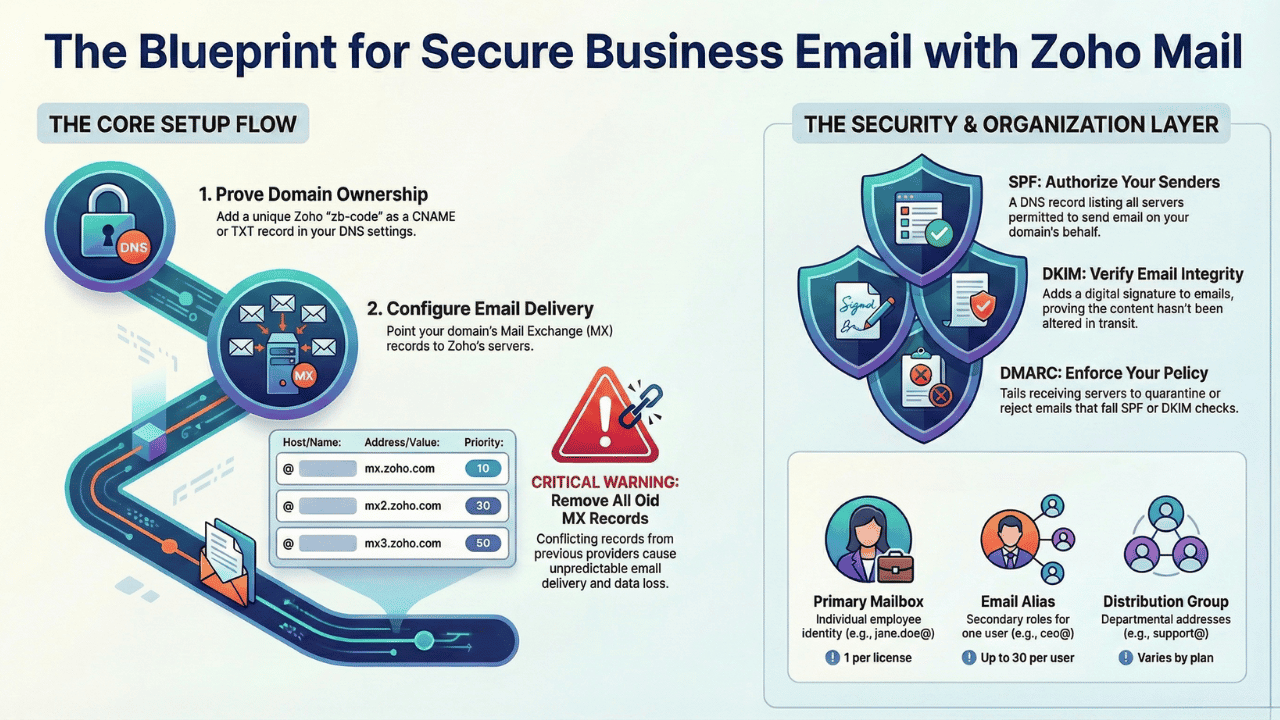
you@yourcompany.com) is not enough to guarantee it will reach its destination. In fact, without a specific set of technical configurations, major providers like Google and Yahoo will likely flag your unauthenticated mail as spam or reject it outright. The foundation of modern email deliverability is the "Authentication Trifecta."These three interconnected protocols prove to receiving servers that an email is legitimate:
• SPF (Sender Policy Framework): A DNS record that acts as a public list, authorizing which servers are permitted to send email on behalf of your domain.
• DKIM (DomainKeys Identified Mail): A cryptographic signature embedded in the email header that proves the message has not been altered in transit and genuinely originated from your domain.
• DMARC (Domain-based Message Authentication, Reporting, and Conformance): The governing policy that tells receiving servers what action to take (e.g., quarantine or reject) if either the SPF or DKIM checks fail.
This is surprising because it reveals a hidden technical layer that is absolutely essential for email's most basic function: deliverability. Setting up a professional email address goes far beyond just creating an account; it requires orchestrating these protocols to build a trusted sender reputation from the ground up.
A recommended deployment path begins with a p="none" policy, which operates in "monitoring mode," allowing mail through while providing data on potential configuration errors. Once the administrator is confident that all legitimate mail sources are correctly authenticated, the policy should be escalated to p="quarantine" (directing failures to spam) and finally p="reject" (blocking unauthorized mail) to provide maximal protection against phishing and spoofing attacks.
2. The Password Is Dead (For Your Favorite Email App)
In the modern era of mandatory Multi-Factor Authentication (MFA), a counter-intuitive reality has emerged: legacy email clients like Microsoft Outlook, Apple Mail, and Thunderbird no longer accept your standard account password. The simple act of typing the password you use for webmail will fail.
To connect these applications, you must use an "App-Specific Password." In Zoho's ecosystem, this is a unique, 16-digit code generated from the Zoho security dashboard—one for each application or device you want to connect.
The security benefit is significant. If a device is lost or stolen, that specific 16-digit code can be instantly revoked without affecting your main account password or the access of your other devices. This is impactful because it fundamentally changes a user behavior—typing in a familiar password—that has been ingrained for decades. It represents a critical security shift that many users only discover when their trusted email client suddenly stops syncing.
3. Microsoft Is the Surprise King of Email Volume (and Zoho Hates Your Sales Outreach)
When it comes to the sheer number of emails a business can send per day, the hierarchy of providers is not what most people would expect. While Google is a dominant force in email, Microsoft 365 offers dramatically higher sending limits for its business users.
Here is a comparison of the daily sending limits for major providers:
• Microsoft 365: 10,000 emails per day
• Google Workspace: 2,000 emails per day
Beyond the raw numbers, the most critical "gotcha" lies buried in the terms of service. Zoho Mail, despite its popularity with small businesses, explicitly prohibits most forms of bulk or automated communication commonly used for sales and marketing.
Zoho Mail explicitly prohibits these email types in their Terms of Service:
• ❌ Promotional emails
• ❌ Mass emails
• ❌ Marketing emails
• ❌ Newsletters
• ❌ Automated emails
• ❌ Transactional emails
• ❌ Cold email outreach
This information is vital for any business, especially startups, that might choose a provider based on attractive entry-level pricing. Without understanding these limitations, a company could select a service that fundamentally conflicts with its core sales and marketing activities, leading to account suspension or termination.
4. The "Catch-All" Mailbox: Your Best Friend and Worst Enemy
A "catch-all" email account is a designated mailbox that captures any email sent to an invalid or misspelled address at your domain. For instance, if a potential client mistakenly sends an inquiry to
abc_d@yourdomain.com instead of the correct abc.d@yourdomain.com, the email will not bounce. Instead, it will be delivered to the catch-all account, preventing a lost opportunity. An administrator can then review the message and route it to the intended recipient.However, this feature comes with a significant downside. Because it accepts email sent to any address at your domain, it can become a magnet for spam. Automated bots often try to guess common email prefixes (
info@, sales@, contact@), and a catch-all ensures that all of these attempts land in an inbox. Paradoxically, Zoho notes that this feature can also discourage certain brute-force spam attacks, as spammers can no longer rely on bounced emails to identify valid vs. invalid addresses on a domain.This dual nature makes the catch-all a powerful tool for resilience against human error, but one that requires careful management to avoid being overwhelmed by unwanted mail.
5. An Alias Is Not a Group (and Knowing the Difference Is a Strategic Superpower)
The terms "alias" and "group" are often used interchangeably, but they represent two fundamentally different structures for managing email. Understanding the distinction is a strategic advantage for any business.
• Email Alias: This is an additional email address for a single user account. Think of it as a nickname for an existing mailbox. Aliases are perfect for creating title-based addresses like
ceo@yourcompany.com that forward to an individual's primary inbox or for setting up temporary addresses for marketing campaigns. All mail sent to an alias funnels into one person's account.• Email Group (or Distribution List): This is a single email address shared by a set of users. When an email is sent to a group address like
support@yourcompany.comA copy of that message is delivered to the individual mailboxes of every member in the group.Furthermore, groups offer a surprising level of control. Administrators can set permissions to define who can send messages to the group, such as Public (anyone), Restricted to Organization Members only, or Private (only other group members can send messages to it). Choosing between an alias and a group is a strategic decision (such as setting it to Public for a
support@yourcompany.com address, restricted to Organization Members for an all-staff@ internal newsletter, or Private for a sensitive project-alpha-team@ address) that enables a business to manage communication flows efficiently, professionally, and precisely.Conclusion: Is Your Email Working for You, or Just Collecting Messages?
Business email is a far more complex and strategic tool than it appears on the surface. What seems to be a simple messaging application is actually a sophisticated system governed by hidden technical rules, provider-specific limitations, and powerful structural features.
From ensuring deliverability through authentication protocols to choosing the proper account structure for team collaboration, understanding what happens behind the scenes is key to unlocking the true potential of your company's primary communication channel.
Now that you've seen what happens behind the scenes, is your business using its email as a strategic asset or just a digital mailbox?